Overlay Title Transitions: A Seamless After Effects Solution
More Than a Transition: A Dynamic Design Asset
When you're piecing together a video, whether it's a brand story, a product launch, or a social media reel, the moments between clips matter just as much as the clips themselves. A jarring cut can break the viewer's flow, while a smooth, intentional transition reinforces your message and maintains a polished, professional feel. This is where the Overlay Title Transitions After Effects template excels. It’s not just a set of wipes or fades; it's a multi-purpose animated transition pack designed to integrate your messaging directly into the movement of the edit.
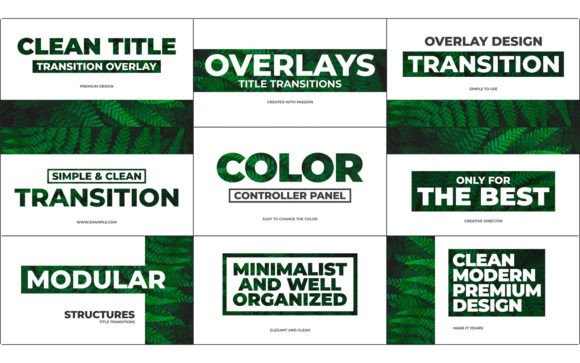
Visually, the personality of these transitions is best described as clean, smooth, and modern. The animations are simple and elegant, avoiding unnecessary flair in favor of a sleek, contemporary aesthetic. This makes them incredibly versatile. They don't scream for attention but rather guide the viewer's eye with a confident subtlety. Think of them as a modern typography tool for motion—your text doesn't just appear; it becomes part of the visual narrative, sliding, fading, or revealing in a way that feels organic to the footage. For creators aiming for a sophisticated brand identity in their video content, this template provides a foundational design asset that elevates the entire production.
Practical Applications Across Creative Projects
The true strength of the Overlay Title Transitions template lies in its flexibility. Because it's built entirely within After Effects and requires no third-party plugins, it fits seamlessly into a wide range of workflows. A social media manager can use it to create engaging Instagram Stories or TikTok videos where text overlays are crucial for silent viewing. A content creator or YouTuber can apply it to introduce new segments, highlight key points, or create stylish lower thirds that feel integrated rather than tacked on. For entrepreneurs and small business owners, it's a tool for producing professional-looking video ads, product demos, or team introductions without the budget for a dedicated motion graphics artist.
Consider its use in editorial design for digital magazines or online courses. These transitions can introduce new chapters, highlight quotes, or transition between talking-head segments and B-roll, maintaining a consistent visual language throughout. The template's modular structure means you can mix and match the nine included styles to keep your edits dynamic without losing coherence. It's equally effective for personal projects—think wedding videos, travel vlogs, or family montages—where adding a touch of professional polish makes the final product more memorable and enjoyable to watch. The key is that it adapts to your content, not the other way around.
Streamlining Your Workflow and Brand Consistency
One of the most significant practical benefits of this After Effects template is the time it saves. The included project control panel is a standout feature, allowing you to customize colors, timing, and text from a single, centralized interface. This eliminates the need to dig through complex compositions, making it accessible even for those with intermediate After Effects skills. The accompanying video tutorial further flattens the learning curve, ensuring you can start customizing quickly. This efficiency is crucial for busy marketers, publishers, and designers who need to produce high-quality video content regularly.
From a branding perspective, this template is a powerful tool for ensuring consistency. By using the same set of styled transitions across all your video content, you reinforce your brand's visual identity. The ability to edit colors to match your brand palette is essential. This consistency builds recognition and professionalism. A viewer who sees your Instagram Reel and then your website video should have a cohesive experience. The Overlay Title Transitions template helps achieve that by acting as a consistent typeface for your motion graphics. It ensures your text overlays—whether they are calls to action, informational tags, or artistic statements—always look and feel like they belong to your brand, enhancing overall readability and visual hierarchy in your video projects.
Key Features and Practical Considerations
Before diving in, it's helpful to understand the core features that make this template a valuable addition to your toolkit. Here’s a breakdown of what you get and how to evaluate its fit for your projects:
- 9 Overlay Title Transitions Included: This offers enough variety to keep your edits interesting without being overwhelming. You can dedicate different styles to different content types (e.g., one for headings, another for quotes).
- No Plugin Required & Works with AE CC 2014+: This broad compatibility means you can use it on most modern systems without extra costs or installation hassles. It's a self-contained, premium font and animation solution.
- 100% After Effects with Universal Expressions: Everything is native, which generally means better stability and easier customization if you're familiar with the software. Universal Expressions ensure it works regardless of your After Effects language setting.
- Modular Structure: This is a huge plus for flexibility. You can easily duplicate, rearrange, or extend transition segments to fit your exact edit timing.
- Free Font Link Included: The template uses a free, commercially licensed font, which simplifies your commercial font considerations. Always double-check the license for your specific use case.
When evaluating this for a project, test it with your actual footage and brand colors. Does the animation style complement your video's pacing? Does the chosen display font align with your brand's voice—whether it's a sans serif font for a clean, techy feel or a script font for a more personal touch? The template's simplicity is its strength, but ensure it provides the right level of impact for your audience. For projects requiring more ornate or complex typographic animations, you might need additional design assets. However, for creating a cohesive, professional, and efficient video editing system, the Overlay Title Transitions template is a remarkably practical and effective tool that delivers real-world value.